Every User in the Portal Before They Ever Log In.
Real-Time Directory Sync (RTDS) automatically synchronizes users, groups, and group memberships from your directory or data source into the campus portal independent of login. The portal always reflects the source system: accounts exist before day one, roles follow the record, and departures are enforced centrally.
200+ institutions · 5 source types · the engine under every Unifyed portal
Request a Demo
See your campus through the analytics layer.

Why RTDS
Provisioning at Login Is Provisioning Too Late.
When users are created the first time they sign in, the portal only knows about the people who have already shown up bulk operations are impossible, group-based access can't be set ahead of time, and mismatched logins quietly create duplicate accounts. RTDS flips the model: the source system drives, and the portal always reflects it.
Users exist before first login
every eligible student, faculty, and staff member is in the portal before day one, not after their first sign-in.
Bulk provisioning
the start-of-term wave is loaded from the source in one pass, not built one login at a time.
Group-based access control
groups and memberships sync with the users, so access rules are in place before anyone arrives.
Joiner / mover / leaver, enforced centrally
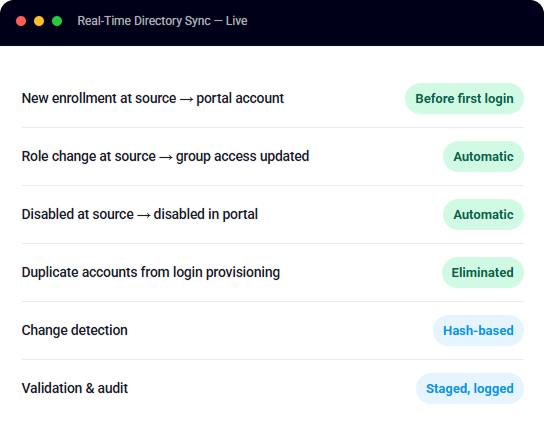
new records create accounts, changed records update them, and disabled records propagate automatically.
No duplicate accounts
every user is keyed to a unique primary identifier (a Banner ID, employee ID, or directory attribute), eliminating the duplicates login-based provisioning creates.
Validated before it lands
a staging layer cleans, de-duplicates, and verifies every record before it touches the portal, with a full audit trail.
How It Works
Source to Portal, With a Quality Gate in Between
RTDS moves identity data through a controlled staging layer so what reaches the portal is clean, validated, and fully tracked.
Step 1
Source System
- Active Directory, XML, CSV, SQL database, or REST API
- Users, groups, and group memberships read from the system that owns them
- Keyed to a unique primary identifier Banner ID, employee ID, or a directory attribute
Step 2
Staging & Validation
- Records cleaned and de-duplicated; invalid or keyless entries filtered out
- Hash-based change detection only real changes move forward
- User–group relationships verified; delete/disable flags confirmed
- Every change logged for audit
Step 3
Campus Portal
- Accounts created, updated, or disabled to match the source
- Groups and memberships aligned for access control
- Portal identity data always reflects the system of record
Connect Anything
Seven Ways in Your Source of Truth Stays in Charge
Whatever system owns your identity data, RTDS can read it the directory, an SIS export, or a custom feed.

Active Directory
Users, groups, and memberships read directly over LDAP.

XML Files
Delivered over FTP/SFTP on your refresh schedule.

CSV Files
Flat-file exports from any system that can produce them.

SQL Database
Read directly from your tables or views.

REST API
Pull from any system with an API including SIS platforms.

Microsoft Entra
Users, groups, and memberships read directly over LDAP.

RaaS Workday
Pull user names, group memberships, and access
Lifecycle & Security
The Source Decides. The Portal Follows.
Because RTDS runs independent of login, lifecycle is enforced by the system of record not by whether someone happens to sign in. Joiners get accounts before they arrive, movers get updated access as their record changes, and leavers lose access when the source says so.
- Joiner: a new record at the source becomes a portal account before the first login, with group access already in place.
- Mover: role and membership changes at the source update portal access automatically.
- Leaver: disabled or deleted at the source, disabled in the portal the flags propagate; no orphaned accounts waiting on a manual cleanup.
- Everything auditable: the staging layer tracks every create, update, and disable it processes.
For Unifyed Campuses
The Engine Under Every Unifyed Portal
If you run Unifyed, this sync is already running on your campus.
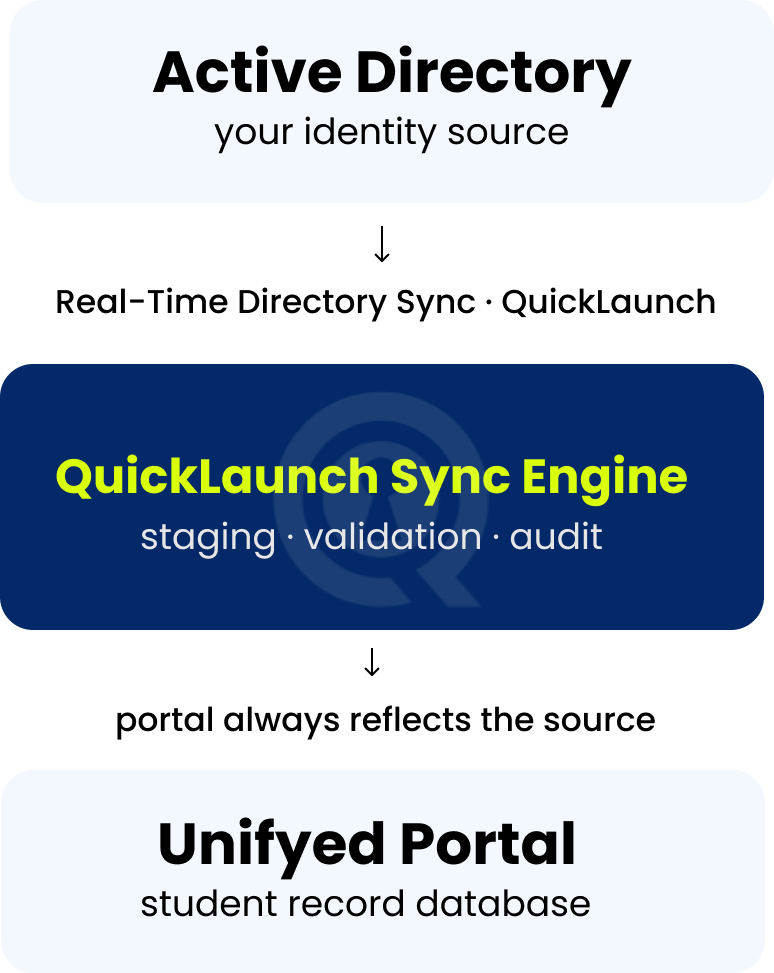
Every Unifyed portal runs on QuickLaunch under the hood: we provide the login bridge that signs your users in, and the real-time sync between Active Directory and the portal's student record database that keeps accounts, groups, and memberships aligned with the source.
That's why moving to the full QuickLaunch platform is an upgrade, not a migration: the same engine that already keeps your portal aligned extends to lifecycle automation, passkeys, the full MFA suite, and single sign-on across every campus appWho Wins
Benefits by Role
Registrar & Enrollment
The start-of-term wave loads from the source in bulk — every admitted student exists in the portal with the right group access before orientation, not after their first login attempt.

IT Operations
No duplicate-account cleanup, no manual provisioning queues, no reconciliation scripts. The staging layer validates the data, and the audit trail shows exactly what changed and when.

CISO
Leavers are enforced by the system of record — disable at the source and the portal follows automatically. Lifecycle stops depending on manual tickets and login events.

Students
Day one actually works: the account exists, the groups are right, and the portal knows who they are before they ever type a password.
Results Across the Network
The Numbers Institutions See
FAQ
Frequently Asked Questions
Case Studies
Institutions Already on One Login
 55,000+ FTE · <2 Months
Community College of Baltimore County
Centralized SSO across 100+ service providers with guided self-service account claim cutting a 1,000-reset-a-day help desk by nearly 95%.
 SSO + MFA
Texas A&M International University
Single sign-on and multi-factor authentication across the campus application portfolio, with self-service reset taking onboarding off the help-desk queue.
 Passwordless Onboarding
University of Houston-Clear Lake
First-time account claim with no temporary passwords and SSO for students, faculty, and staff branded end to end to the institution.
Ready for a Portal That Always
Reflects the Source of Truth?
Users, groups, and memberships synced from your directory validated, audited, and in place before the first login.